
After creating vouchers, merchants may need to manage usage, verify payments, deactivate codes, or adjust applied discounts.
This guide explains how to handle vouchers during and after campaign execution.
1️⃣ Offline Payment Reconciliation (Important)
If a customer selects an Offline Payment Method (e.g., bank transfer):
✔ The voucher discount is applied immediately at cart stage
✔ The system reduces the payable amount
✔ Payment is not automatically confirmed
What Merchant Must Do
When payment is received:
1️⃣ Go to the order
2️⃣ Verify the transferred amount
3️⃣ Perform Payment Reconciliation
4️⃣ Confirm payment manually
Why This Is Important
If reconciliation is not done carefully:
❌ Payment mismatch may occur
❌ Accounting errors may happen
❌ Order may remain pending
Always confirm that the payment received matches the discounted total.
2️⃣ Deactivate a Voucher
You may need to stop a voucher before its expiry date.
✔ You define the voucher prefix
✔ System auto-generates unique codes
✔ All vouchers share the same settings
How to Deactivate
1️⃣ Go to Vouchers
2️⃣ Select the voucher
3️⃣ Click ACTIVATE (top right)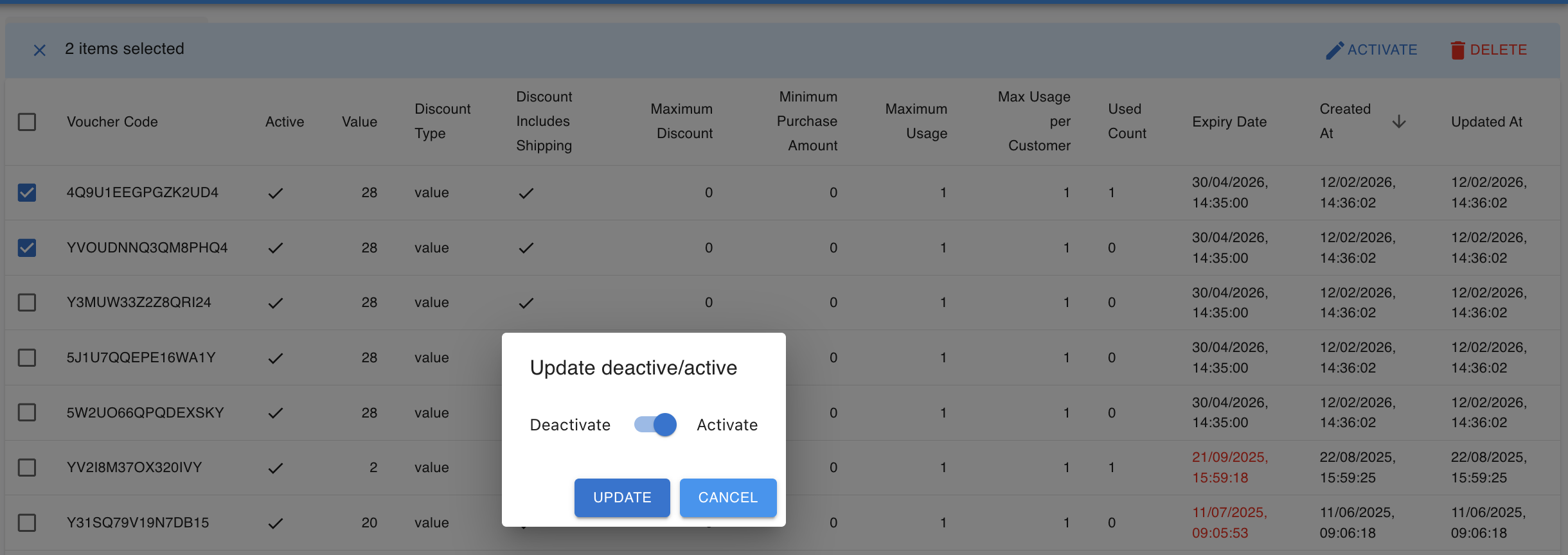
⚠ Important Limitation
One time can generate a maximum of 100 vouchers.
If more vouchers are needed, you must generate them in batches.
What Happens After Deactivation
✔ Customers cannot apply the voucher anymore
✔ New orders cannot use it
✔ Previously applied vouchers remain valid
When Should You Deactivate?
✔ Campaign ended early
✔ Wrong discount value set
✔ Code abuse detected
✔ Need to stop distribution
3️⃣ Remove Voucher from an Order
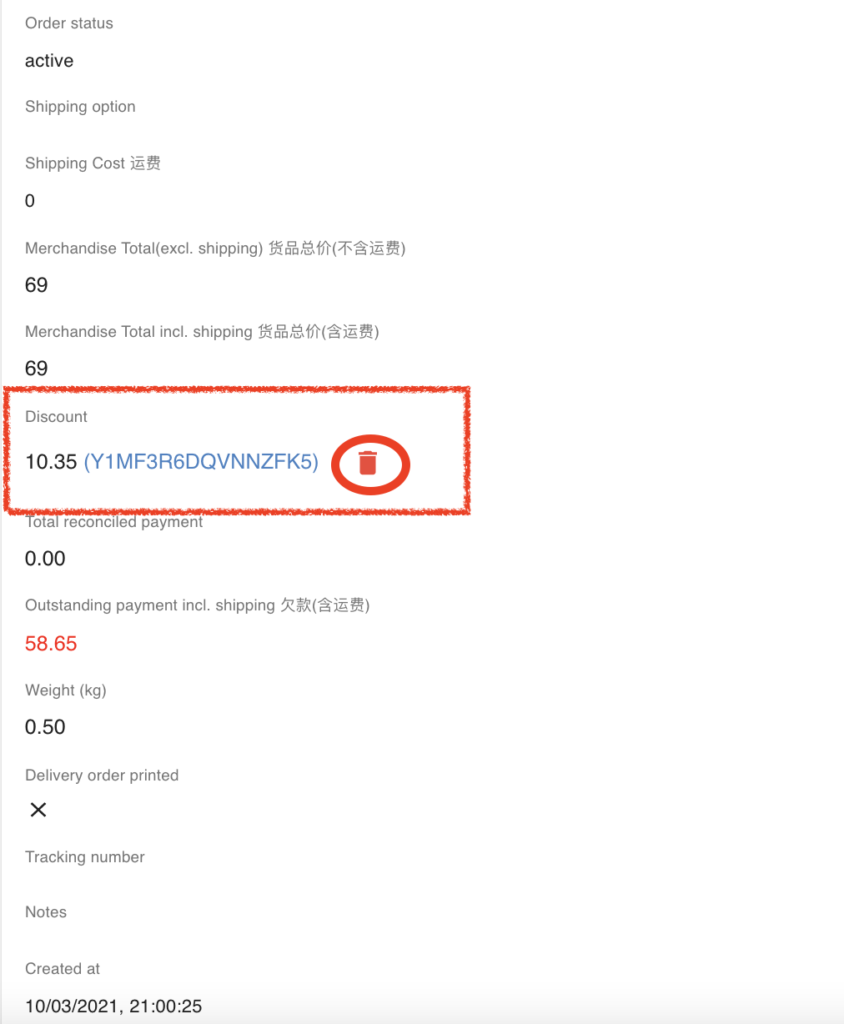
Sometimes a voucher needs to be removed from an existing order.
1️⃣ Open the specific order
2️⃣ Locate the applied voucher
3️⃣ Remove or adjust the voucher
Important Notes
• Removing a voucher changes payable amount
• If payment was already made, adjust reconciliation carefully
• Always inform customer before modifying discount
4️⃣ Export Voucher List
You may export voucher data for:
✔ Usage tracking
✔ Campaign reporting
✔ Accounting review
Bulk vouchers are especially useful for tracking unique code usage.
5️⃣ Common Issues & Quick Checks
Before contacting support, check:
✔ Has the voucher expired?
✔ Was it already used?
✔ Was minimum purchase met at application time?
✔ Is the voucher deactivated?
✔ Is payment reconciled (for offline method)?
Most voucher issues are caused by configuration settings.
6️⃣ Recommended Workflow for Safe Campaign Management
Before Campaign:
✔ Test voucher logic
✔ Confirm discount calculation
✔ Check shipping interaction
During Campaign:
✔ Monitor usage
✔ Check abnormal usage
✔ Deactivate if necessary
After Campaign:
✔ Deactivate voucher
✔ Review usage report
✔ Reconcile offline payments
✔ Archive campaign data