
Boxify AI Assistant (Powered by GPT)
Boxify AI lets you set up an automatic reply assistant for Facebook and Instagram that only responds according to your instructions — you stay in full control of what it says, what it avoids, and when it hands off to you.
How to enable GPT Customer Service in Boxify
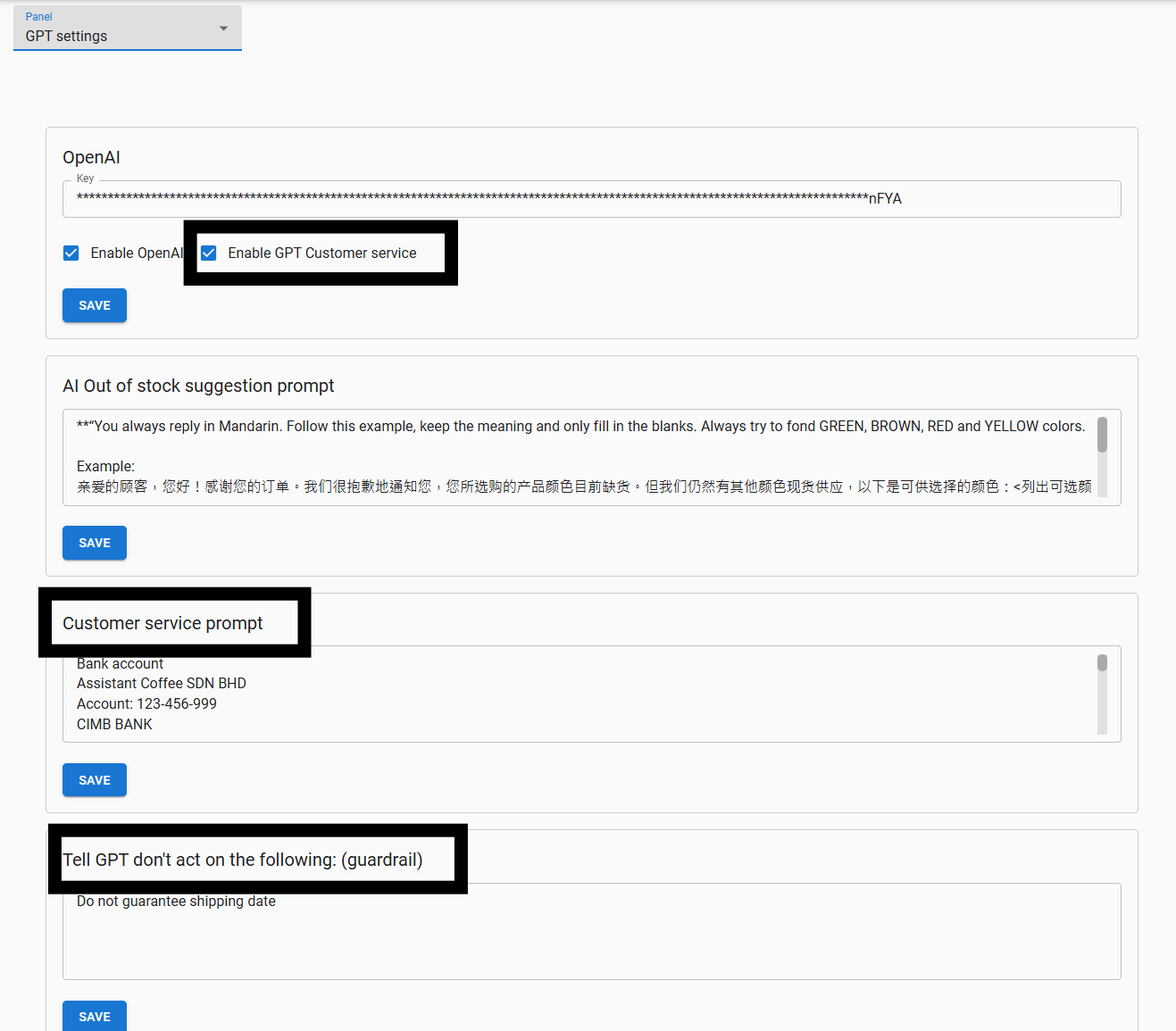
Section titled “How to enable GPT Customer Service in Boxify”- Log in to Boxify, then go to Settings › Integrations › GPT Settings.
- Tick Enable OpenAI.
- Tick Enable GPT Customer Service.
- Enter your OpenAI API key to connect Boxify to the GPT service.
Getting an OpenAI API key
Section titled “Getting an OpenAI API key”- Go to the OpenAI website and sign up or log in.
- Click your profile in the top right corner.
- Select API Keys, then create a new secret key.
- Copy the key immediately — OpenAI will not show it again.
- Paste it into the OpenAI field in Boxify and click Save.
The 4 controls you manage
Section titled “The 4 controls you manage”You control Boxify AI with four settings:
- AI Out of Stock Suggestion Prompt
- Customer Service Prompt
- Guardrails — Tell GPT what not to act on
- Customer Service GPT Playground (for testing)
1. AI Out of Stock Suggestion Prompt
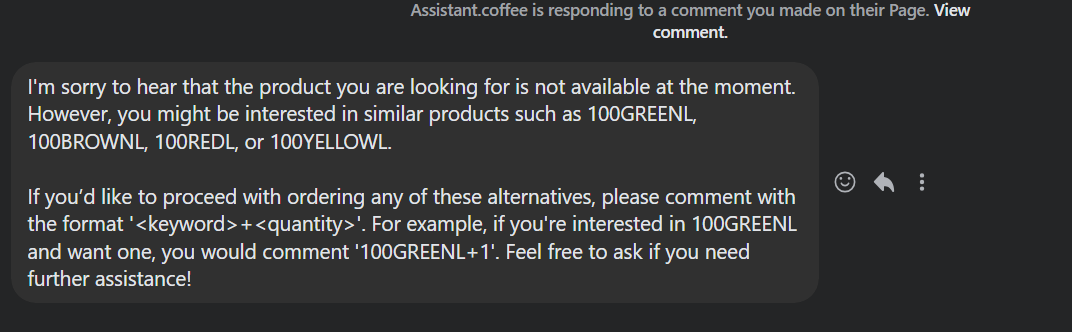
Section titled “1. AI Out of Stock Suggestion Prompt”When a customer comments on a keyword that has run out, the AI replies with suggestions for similar products instead of leaving them with no answer.
This prompt controls what it says. A safe starting template:
If the item is out of stock, reply politely: “This item is currently out of stock. Would you like to see similar items?” Only suggest alternatives if stock is confirmed available. Do not guess availability.
2. Customer Service Prompt
Section titled “2. Customer Service Prompt”This is where you define your AI’s personality and what it can answer — like training a new staff member. Include details such as:
- Your business name and what you sell
- Shipping and payment information
- Live session schedule
- How you want the AI to greet customers
Recommended starter prompt:
You are the customer service assistant for [Shop Name]. Reply politely and professionally. Keep replies to 3 short sentences. Answer questions about price, stock, and shipping. If a customer asks about refunds, complaints, or payment disputes, escalate to a human agent. Do not guarantee delivery dates. Do not make up information. If unsure, say: “I will check with our team and get back to you shortly.”
Replace [Shop Name] with your business name before saving.
3. Guardrails — “Don’t Act On The Following”
Section titled “3. Guardrails — “Don’t Act On The Following””Guardrails are your safety lock. Any topic listed here will be escalated to a human instead of answered by the AI. Recommended guardrails:
- Do not handle refund or return requests.
- Escalate all payment disputes to human support.
- Do not approve or promise any discount.
- Do not guarantee delivery dates or arrival times.
- Do not share any sensitive customer information.
4. Test in the Customer Service GPT Playground
Section titled “4. Test in the Customer Service GPT Playground”Before going live, test your setup in the Playground. Run these five tests:
- Ask about price.
- Ask about stock.
- Ask about shipping.
- Ask about refunds.
- Ask something completely unrelated to your shop.
Expected results: price and stock answered correctly, refund question escalated to human, no unwanted promises, replies are short and on-topic. If any reply feels wrong, adjust your prompt or guardrails and test again.
Teach customers to order in Messenger
Section titled “Teach customers to order in Messenger”Combine the AI with Enable Message Capture (under Settings › General › Parameters) and it can walk customers through ordering.
Example prompt: “Teach the customer to place an order by commenting <keyword>+<quantity> in Messenger.”
Why Boxify GPT is safe
Section titled “Why Boxify GPT is safe”The AI only replies based on your instructions. If it replies incorrectly, the fix is adjusting your prompt or guardrails — not a sign the AI is unreliable. You always control what it says, what it avoids, and when it passes the conversation to you.
Example Customer Service Prompt
Section titled “Example Customer Service Prompt”Business Info:Assistant Coffee SDN BHDAccount: 123-456-999CIMB BANKWe sell women's fashion and accessories through Facebook Live.
Chatbot Name: CoffeeBot
---
Customer Service Policy:- Friendly, 24/7 support via Facebook Chat- Follow-up after orders to ensure satisfaction- Multichannel support available (email, WhatsApp)
Example Reply:Hi [Customer Name],I'm CoffeeBot from Assistant Coffee.We're available 24/7 — message us anytime via Facebook or email us at support@example.com.Let me know how I can assist you with your order.— CoffeeBot
---
Out-of-Policy Request Handling:- Policies are firm, but we try to help where possible- GPT may offer store credit, discounts, or escalate to a human
Example Reply:Hi [Customer Name],I understand your concern. While we can't [request], how about a store credit or a special discount for your next order?I've passed this to our team — you'll hear back by [date].Thanks for your patience.— CoffeeBotSee also:
- Conversation Manager
- Customers Contact
- AI Connect (MCP) — a different feature: connect your own AI to ask questions about your store data.