
Facebook Blocked My Account from Sending Messages
Boxify sends order notifications and checkout links to customers through Facebook Messenger. Sometimes Facebook temporarily blocks your Page from sending messages. This is a Facebook platform policy behavior, not a Boxify error.
What “blocked” looks like
Section titled “What “blocked” looks like”When your Page is blocked from messaging, you may see messages such as:
- “Your Page can’t send messages right now.”
- “You can’t reply to this conversation.”
- “Messaging temporarily restricted.”
- “Please secure your account.”
These indicate that Facebook has limited your Page’s ability to send messages, usually due to messaging behavior that triggered a policy check.
Why this happens
Section titled “Why this happens”1. High-volume or suspicious activity
Section titled “1. High-volume or suspicious activity”Rapid or repetitive messaging that looks automated or spam-like can trigger a restriction.
2. User spam reports
Section titled “2. User spam reports”If users report your messages as spam or harmful, Facebook may restrict your Page’s messaging.
3. Messaging policy violations
Section titled “3. Messaging policy violations”Violations include sending unsolicited promotional content, repeated broadcasts outside allowed time windows, and excessive auto-replies.
How this affects your customers
Section titled “How this affects your customers”While your Page is restricted:
- Order notification messages may not be delivered.
- Customers may not receive payment links.
- Automated replies may fail.
- Messenger actions may be limited.
This restriction temporarily stops Boxify’s message delivery.
How to resolve a messaging restriction
Section titled “How to resolve a messaging restriction”Step 1: Review Page Quality
Section titled “Step 1: Review Page Quality”Go to your Facebook Page › Page Quality or Support Inbox. See Monitor Your Page Quality & Insights. Check for policy violations, spam reports, and temporary restrictions.
Step 2: Reduce spam-like messaging behavior
Section titled “Step 2: Reduce spam-like messaging behavior”Avoid sending identical auto-messages repeatedly, sending message bursts to many users at once, and messaging users outside the 24-hour interaction window.
Step 3: Avoid incentivized sharing abuse
Section titled “Step 3: Avoid incentivized sharing abuse”Do not ask users to share or comment in ways that violate Facebook’s platform rules.
Step 4: Wait for the restriction to lift
Section titled “Step 4: Wait for the restriction to lift”Some restrictions are temporary and lift automatically after a cooldown period.
This is not a Boxify issue
Section titled “This is not a Boxify issue”This restriction is not caused by keyword setup, Messenger configuration, or a Boxify system error. It is caused by Facebook’s platform policy and automated protection.
Facebook Jail and Account Restrictions
Section titled “Facebook Jail and Account Restrictions”“Facebook Jail” refers to situations where Facebook limits or restricts your Page or account because of suspected spam, policy violations, or unusual activity. Facebook does not use this term officially, but the restrictions are real and can affect your live selling.
What Facebook can restrict
Section titled “What Facebook can restrict”- Sending messages
- Posting content
- Replying to comments
- Auto-replies
- API access for external apps like Boxify
- Page publishing features
These restrictions happen when Facebook’s automated systems detect activity that may violate its policies.
Common causes of restrictions
Section titled “Common causes of restrictions”1. High-volume messaging
Section titled “1. High-volume messaging”Sending a large number of messages in a short time can trigger limits. This includes auto-replies at scale, repeated promotional content, and instant replies sent to many users at once.
2. Unusual engagement behavior
Section titled “2. Unusual engagement behavior”Facebook may flag accounts that send too many identical messages, receive a high number of spam reports, or show bot-like interaction patterns.
3. Policy violations
Section titled “3. Policy violations”Violating Facebook Community Standards or Messaging Policies can cause restrictions. Examples include incentivizing sharing incorrectly, using prohibited content, and running automated sequences that break platform rules.
4. Repeated API permission issues
Section titled “4. Repeated API permission issues”If permissions are revoked or removed repeatedly, reauthorization may be limited temporarily.
Signs your Page is restricted
Section titled “Signs your Page is restricted”Facebook will not say “Your account is jailed,” but you may see messages such as:
- “Messaging restricted”
- “Your Page limits have been applied”
- “You can’t post right now”
- “Bot actions are blocked”
- “Please secure your account”
Check for these alerts in Facebook Page Quality, Page Support Inbox, and Meta Business Suite alerts.
Why this is not a Boxify bug
Section titled “Why this is not a Boxify bug”Boxify sends messages and creates orders using Facebook’s allowed API and permissions. If Facebook restricts your account, Boxify cannot override those limits. Orders may still be created in the system, but Messenger delivery will stop until Facebook lifts the restriction.
How to reduce the chance of being restricted
Section titled “How to reduce the chance of being restricted”Follow the 24-hour messaging rule
Section titled “Follow the 24-hour messaging rule”Send messages within 24 hours of a customer interaction. Do not send promotional messages outside this window.
Avoid spam-like sequences
Section titled “Avoid spam-like sequences”Do not send multiple promotional messages in one burst, send identical messages to many users immediately, or use incentivized sharing in ways that violate policy.
Monitor Page Quality regularly
Section titled “Monitor Page Quality regularly”Go to Facebook Page › Page Quality › Support Inbox and check for policy warnings, Community Standards violations, and message restrictions.
Keep Messenger permissions updated
Section titled “Keep Messenger permissions updated”Reconnect your Page in Boxify if permissions expire.
Tips for live selling
Section titled “Tips for live selling”- Avoid sending too many auto-replies in a short burst during a live session.
- Use manual replies when possible.
- Avoid promotional loops that look like automation.
How to tell if this is a platform issue
Section titled “How to tell if this is a platform issue”If messages or replies fail only after a period of heavy activity, and order creation still works normally in Boxify but Messenger features stop responding, the cause is almost certainly a Facebook restriction — not a Boxify error.
If you believe Facebook made a mistake, you can check your Page using the Facebook Sharing Debugger and report the issue to Facebook.
Spam and Security Alerts
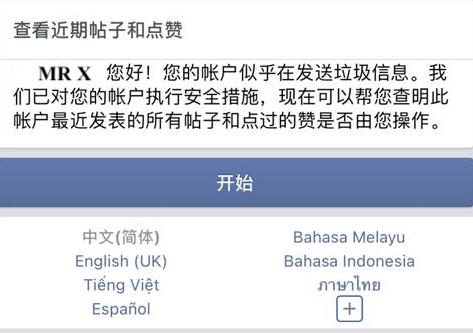
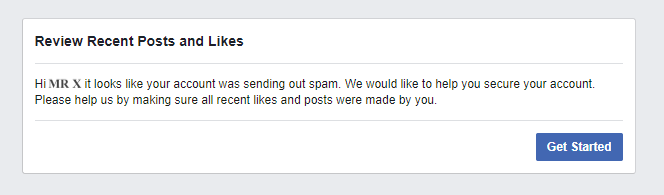
Section titled “Spam and Security Alerts”Facebook sometimes shows a security alert like this:
“It looks like your account was sending spam. We would like to help you secure your account.”
This is not a Boxify error. It is a notification from Facebook’s security system that may temporarily limit your Page’s ability to send messages.
Why this happens
Section titled “Why this happens”Facebook uses automated systems to protect users from spam and abusive behavior. If Facebook detects messaging patterns that resemble spam or suspicious activity, it triggers a security alert and may limit certain actions temporarily.
Common causes include:
1. Rapid or repeated messaging
Section titled “1. Rapid or repeated messaging”Sending too many similar messages in short bursts, especially outside the 24-hour messaging window.
2. High number of spam reports
Section titled “2. High number of spam reports”If users mark your messages or comment notifications as spam, Facebook may flag your account.
3. Automated interactions detected
Section titled “3. Automated interactions detected”Heavy auto-replies, instant messages sent to many users, or bot-like behavior can trigger Facebook’s filters.
4. Multiple automated tools or Pages
Section titled “4. Multiple automated tools or Pages”Using several tools or integrations at the same time may increase the chance of triggering security protections.
What this means for your Page
Section titled “What this means for your Page”When Facebook triggers a spam or security alert:
- Messenger sending may be limited or temporarily blocked.
- Orders may still be created in Boxify.
- Customers may not receive messages.
- Some automated replies may not go through.
What you can do
Section titled “What you can do”Step 1: Check Page Quality and Support Inbox
Section titled “Step 1: Check Page Quality and Support Inbox”Go to your Facebook Page › Page Quality or Support Inbox. See Monitor Your Page Quality & Insights. Look for spam report notifications, security warnings, and temporary limitations.
Step 2: Reduce spam-like messaging
Section titled “Step 2: Reduce spam-like messaging”Avoid sending repetitive messages too quickly, running heavy auto-reply sequences immediately after many interactions, and sending broadcasts outside the 24-hour interaction window.
Step 3: Reply to user messages manually when possible
Section titled “Step 3: Reply to user messages manually when possible”Manual responses are less likely to be flagged as spam.
Step 4: Use Messenger features correctly
Section titled “Step 4: Use Messenger features correctly”Do not send auto-messages to users who have not engaged with your Page. Do not use incentivized sharing that violates policy, and avoid multiple triggers that send identical text.
Important reminder
Section titled “Important reminder”This alert is a protective action from Facebook, not a malfunction in Boxify. Boxify follows Facebook’s platform rules and can only send messages within the allowed permissions and messaging windows.
To learn more about Facebook’s spam policies, visit the Facebook Help Center.
See also: