
Run Your Live Session
A suggested flow for running a live session with Boxify. Adjust the sequence to suit your own process.
Before you start
Section titled “Before you start”- Read Order Statuses to understand how order statuses work.
- Read Admin Panel Overview to familiarise yourself with the panel layout.
Before the live session
Section titled “Before the live session”- Open the Keywords page and check the keywords and stock quantities you plan to sell. If an item’s stock is zero, customers cannot order it — top it up before you start.
- Tap the Export button (top right of the Keywords page) to download your keyword list as Excel. Print it for reference during the stream, and copy the keywords straight into a pinned comment so you do not have to retype them.
During the live session
Section titled “During the live session”-
Pin your keywords, prices, and products as a comment at the start. Customers who join late can scroll up to see what is available.
-
Announce each keyword clearly as you present the item, and remind customers to comment the keyword plus quantity — for example,
A01+2. -
Watch the Stock Left column on the Keywords page to track remaining inventory.
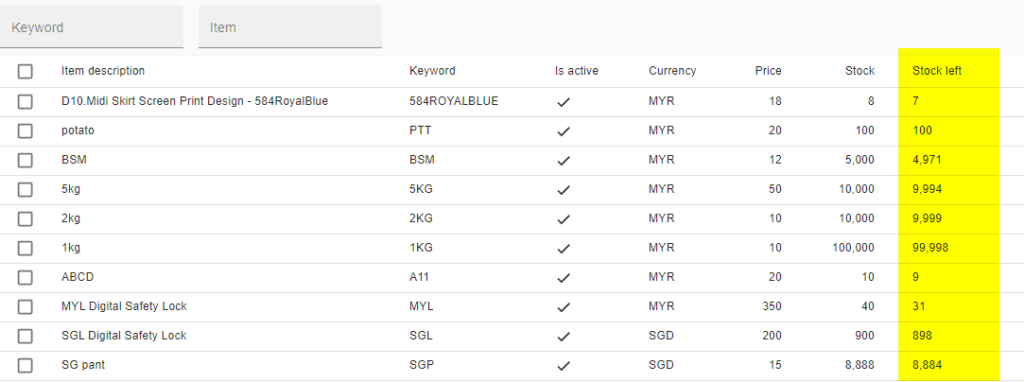
Go to Menu › Keywords › Stock Left column.
-
Handle item swaps carefully. If a customer wants a different item, ask them to comment the new keyword to place a fresh order, then have your customer service team cancel the unwanted item.
The 5-minute duplicate comment rule
Section titled “The 5-minute duplicate comment rule”Facebook’s spam filter blocks duplicate comments within 5 minutes, so Boxify counts each identical keyword comment in that window as one order. There is one exception:
- Customer S comments
A01+1, then wants 2 units total. S must wait 5 minutes and commentA01+1again. Boxify combines both into an order of 2 units. - Customer Z comments
A02+1, then immediately wants 3 units total. Z can commentA02+2right away — a quantity increase is processed without the 5-minute wait. Boxify combines both into an order of 3 units.
After the live session
Section titled “After the live session”Move your orders from Active to Shipped by following the Order Management Workflow: send payment links, reconcile payments, set orders to Ready to Ship, then upload tracking numbers.
See also: