
About Revenue
Revenue in Boxify shows the total value of orders that are confirmed and ready to be fulfilled — not simply orders that were placed.
Revenue includes the shipping fee the customer paid. Cancelled items inside an order are left out of the total.
Which orders count as revenue
Section titled “Which orders count as revenue”An order is included in the Revenue figure only when its status is:
- Ready to Ship
- Shipped
These statuses mean the order has been confirmed, stock is set aside, and the order is prepared for delivery. Orders in any other status are not counted.
Why revenue may differ from sales
Section titled “Why revenue may differ from sales”Boxify uses a stacking system — customers can add items to an existing open order over several days. All those items are combined into one order.
Because of this:
- The Sales Report counts each item by the date it was sold.
- The Revenue figure counts the order by the date the order was created, and only if its status is Ready to Ship or Shipped right now.
This means the two figures will often be different. That is expected behaviour.
Example:
| Day | What happened | Order status |
|---|---|---|
| Day 1 | Customer places order | Active |
| Day 2 | Customer pays | Paid |
| Day 3 | Order is prepared | Ready to Ship |
Once the order reaches Ready to Ship on Day 3, it counts as Revenue on Day 1 — the day it was created, not the day it shipped.
Order statuses not counted as revenue
Section titled “Order statuses not counted as revenue”The following statuses are not included in Revenue:
- Active
- Paid
- Waiting for payment
- Waiting for online payment
- On hold
- No stack
- Locked
- Preorder
Orders in these statuses are counted as Pending Revenue instead. See: About Revenue
How to export the revenue report
Section titled “How to export the revenue report”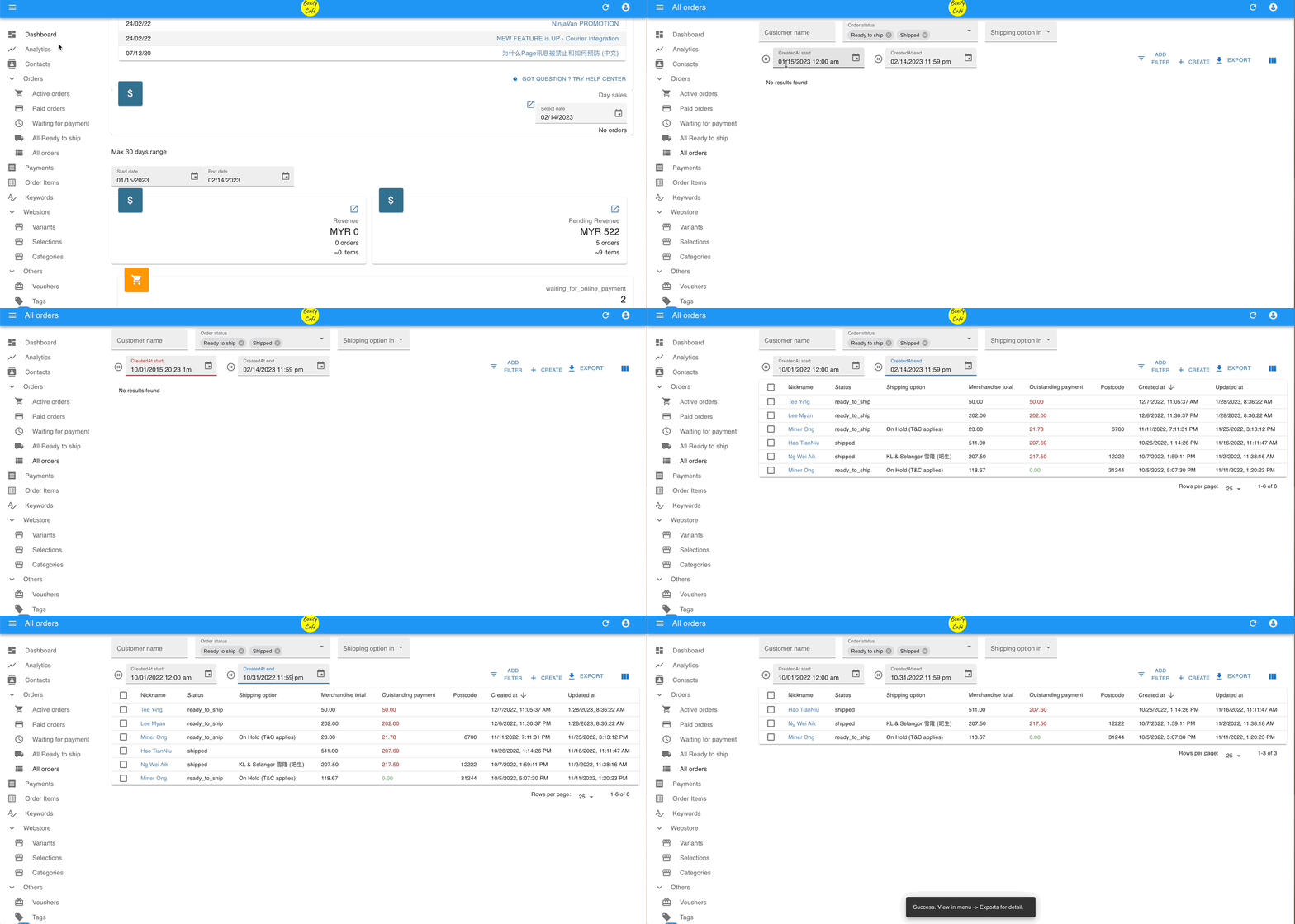
- Go to Dashboard or All Orders in the left menu.
- Filter by order status READY TO SHIP and SHIPPED, and set the start and end date you want.
- Click EXPORT in the top right.
- Click Exports in the left menu.
- Click the download icon (
 ) next to your export file.
 - Select the fields you want in the CSV file, then click EXPORT.
Pending Revenue
Section titled “Pending Revenue”Pending Revenue shows the total value of orders that are in progress but not yet confirmed — money you expect to receive, but that is not yet guaranteed.
Which order statuses count as pending revenue
Section titled “Which order statuses count as pending revenue”An order is included in Pending Revenue when its status is any of the following:
- Active
- Paid
- Waiting for payment
- Waiting for online payment
- On hold
- No stack
- Locked
- Preorder
These orders may still be cancelled, changed, or left unpaid, so Boxify does not count them as confirmed revenue yet.
Why pending orders are not counted as revenue
Section titled “Why pending orders are not counted as revenue”Boxify waits until fulfilment is certain before recognising revenue. Orders in pending statuses are excluded because:
- The customer might cancel or change items.
- Stock may not be available.
- Payment may not be confirmed.
Once an order reaches Ready to Ship or Shipped, it moves out of Pending Revenue and into Revenue.
How to export the pending revenue report
Section titled “How to export the pending revenue report”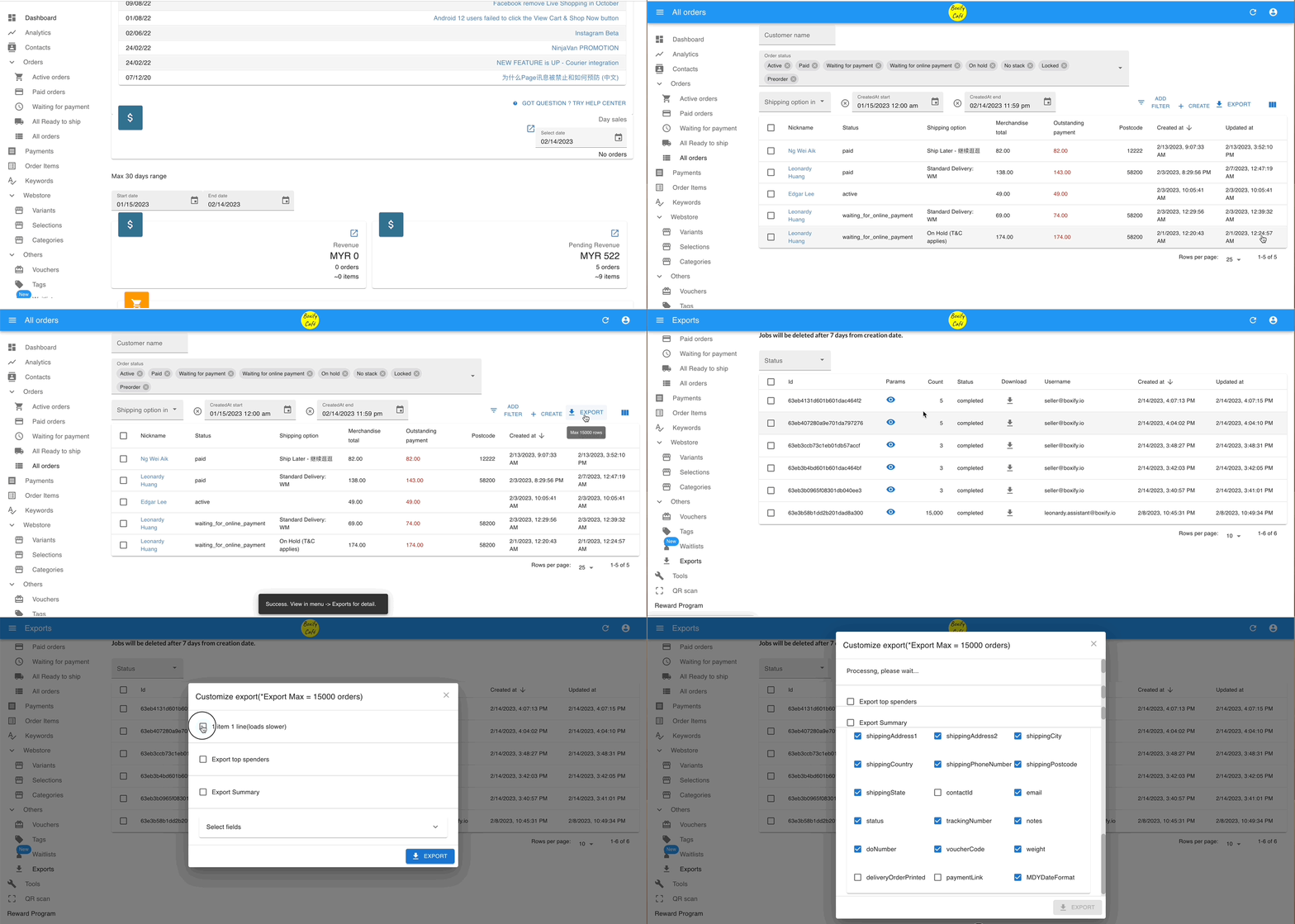
- Go to Dashboard or All Orders in the left menu.
- Filter by order status: ACTIVE, PAID, WAITING FOR PAYMENT, WAITING FOR ONLINE PAYMENT, ON HOLD, NO STACK, LOCKED, and PREORDER. Set the start and end date you want.
- Click EXPORT in the top right.
- Click Exports in the left menu.
- Click the download icon () next to your export file.
- Select Export Standard, choose the fields you want in the CSV file, then click EXPORT.
See also: