
Bulk Print Delivery Orders & Invoices
You can print multiple delivery orders (DO) or invoices in one go — no need to open each order separately.
Print delivery orders and invoices in bulk
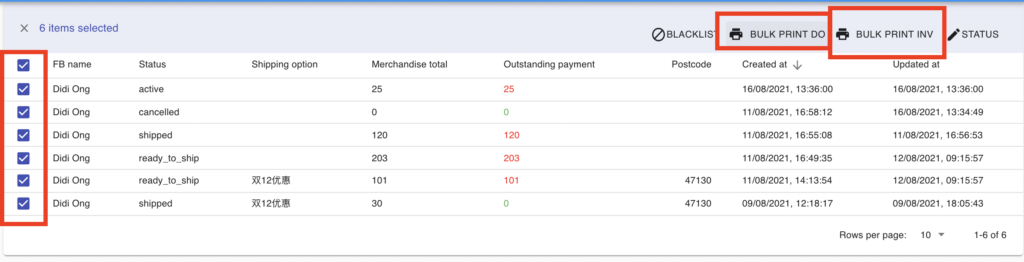
Section titled “Print delivery orders and invoices in bulk”- In the order list, tick the checkboxes next to the orders you want to print.
- Click Bulk print DO to print delivery orders, or Bulk print INV to print invoices.
Turn the print buttons on
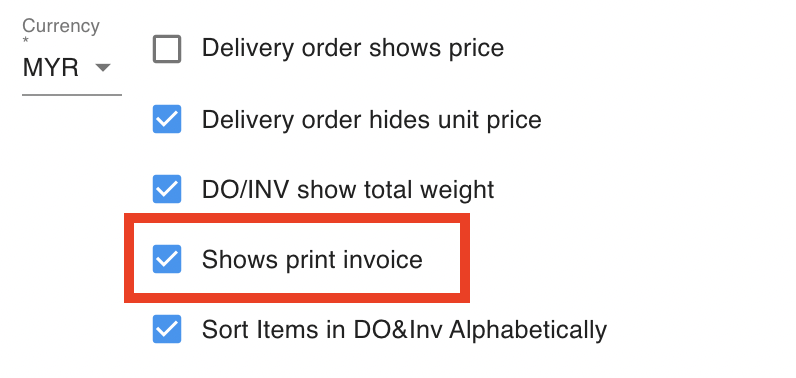
Section titled “Turn the print buttons on”If Bulk print DO or Bulk print INV is missing, switch it on in your document settings.
- Go to Settings › General › Parameters and scroll to DO & Invoice Settings.
- Open Invoice Table and tick Use Invoice to enable the invoice buttons.
- Open Delivery Order Table and tick Use Delivery Order to enable the delivery order buttons.
See also: