
Customer Checkout Process
This guide explains how customers complete checkout in Boxify and how their actions affect order status. Understanding this process helps you avoid confusion around payment and shipping.
Step 1 — Review the cart
Section titled “Step 1 — Review the cart”After items are added to the cart, the customer proceeds to checkout. On the checkout page, customers can:
- Review selected items.
- Update quantities.
- Select a shipping option.
- Choose a payment method.
- Upload a payment receipt (for offline payment only).
Step 2 — Complete all required fields
Section titled “Step 2 — Complete all required fields”Fields marked with an asterisk (*) are mandatory. Customers must fill in all required fields before they can proceed. Required fields typically include name, contact number, delivery address, shipping option, and payment method.
Step 3 — Select a shipping option first
Section titled “Step 3 — Select a shipping option first”The customer must select a shipping option before uploading a payment receipt. This is because the shipping option determines the final amount due. Without a shipping option selected, the system cannot calculate the total and will not allow a receipt to be uploaded.
Step 4 — Choose a payment method
Section titled “Step 4 — Choose a payment method”Customers choose between online payment or offline payment (bank transfer).
Online payment
Section titled “Online payment”- The customer is redirected to the payment gateway.
- Once payment is confirmed, it is reconciled automatically.
- The item status changes to Paid.
- The order status updates based on the shipping option selected.
Offline payment (bank transfer)
Section titled “Offline payment (bank transfer)”- The customer selects a shipping option.
- The customer transfers payment to your bank account.
- The customer uploads a receipt (photo or PDF).
- You verify the payment against your bank statement and mark the item as Paid.
How shipping option affects order status
Section titled “How shipping option affects order status”The shipping option the customer selects determines the order status after payment.
| Shipping Option | Order Status After Payment |
|---|---|
| Ship Later | Paid — customer can continue adding items; not ready to ship |
| Ship Now / WM / EM / SG / etc. | Ready to Ship — proceed to packing |
Revenue is recognised only when the order reaches Ready to Ship or Shipped status.
After checkout
Section titled “After checkout”Once checkout is complete:
- Payment activity appears under Payments.
- Order status updates automatically.
- You can review payment and fulfilment readiness from the Orders section.
Reminders for merchants
Section titled “Reminders for merchants”- Make sure customers select a shipping option before uploading a receipt.
- Verify all offline payments before marking them as Paid.
Customer view of the shopping cart
Section titled “Customer view of the shopping cart”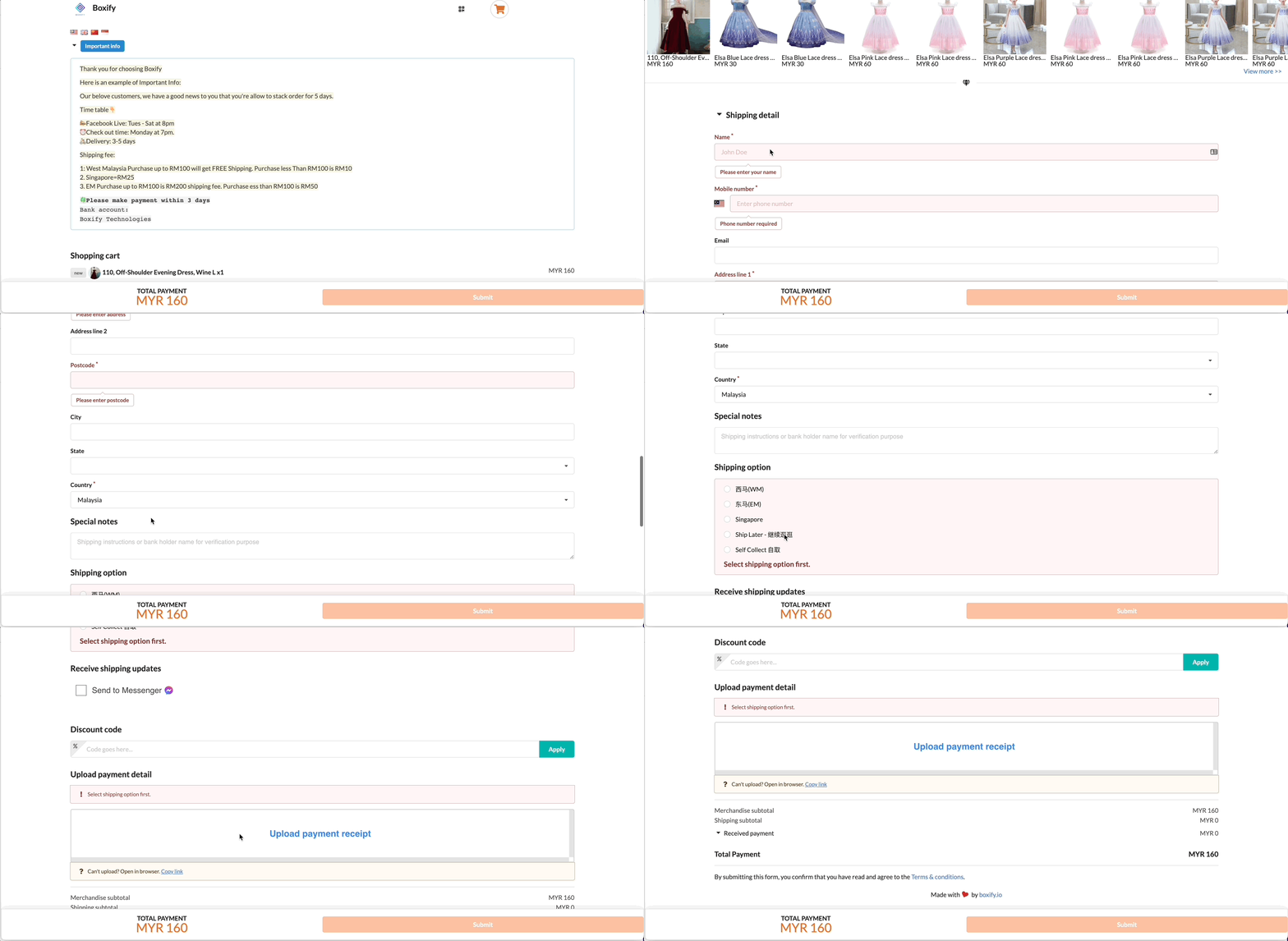
See also: