
Facebook Utility Messages
Facebook limits when a Page can message a customer. Utility Messages are templates you get approved once, so Boxify can keep sending order updates to a customer even when they have not messaged you recently.
Which messages Boxify sends as Utility Messages
Section titled “Which messages Boxify sends as Utility Messages”| Message type | Sent when |
|---|---|
| Cart & payment link | The customer’s cart and payment link go out — tries a normal message first, see below |
| Payment reminder | Automatically, after an order goes unpaid — see Automatic payment reminders |
| Payment confirmed | You mark a receipt from an order as Paid |
| Ready to ship | You change the order to Ready to Ship |
| Shipped | You change an order to Shipped, and it is not a self-collect order |
| Shipped Self Collect | You change an order with the Self Collect shipping option to Shipped |
| Waitlist | You notify customers waiting for an item |
Each type is a separate template and needs its own Facebook approval. Set up the ones you actually use — at minimum Cart & payment link, since that is how customers pay.
How these messages are sent
Section titled “How these messages are sent”Every type above is sent as an approved Utility template, with one exception.
Cart & payment link tries a normal Messenger message first. Boxify falls back to the Utility template only when Facebook refuses that message because the customer has not written to you recently.
Keep templates transaction-only
Section titled “Keep templates transaction-only”Do not include:
- Discounts or sale wording
- Limited-time offers
- Live session invitations
- New product announcements
- Marketing phrases, for example “Don’t miss out!”
You may include:
- Order number
- Cart link
- Payment reminder
- Payment deadline
- Order amount
- Customer support contact
Step 1: Open the template editor
Section titled “Step 1: Open the template editor”- Go to Settings › Messaging › FB Utility Message Templates.
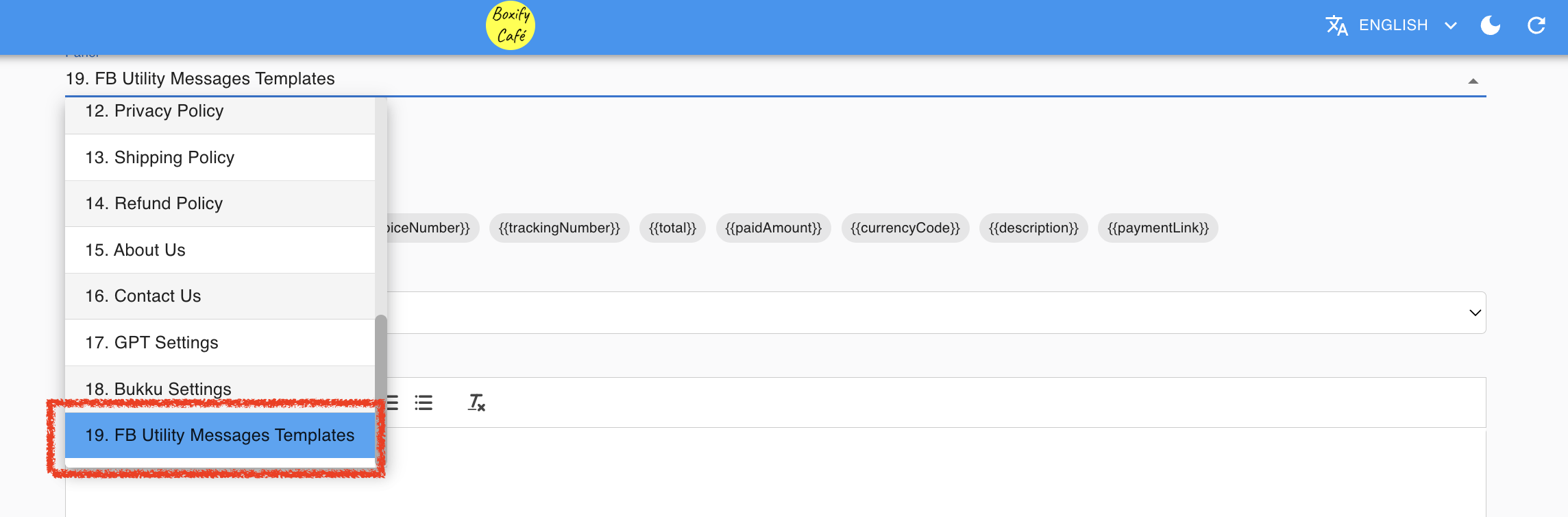
Step 2: Select a message type
Section titled “Step 2: Select a message type”- Click the Message Type you want to configure.
Step 3: Fill in the header
Section titled “Step 3: Fill in the header”- Type a name for this template in the Header field.
Suggested names:
- Order Payment Reminder
- Cart Payment Link
Step 4: Fill in the body message
Section titled “Step 4: Fill in the body message”- Edit the message body as needed. Boxify provides a default template you can customise.
Keep your message:
- Short and clear
- Focused on the transaction
- Free from promotional language
Safe example:
Your order
{{orderNumber}}is ready. Please proceed with payment using the link below. If you need assistance, feel free to contact us.
Placeholders you can use
Section titled “Placeholders you can use”Boxify replaces these with each customer’s real order details when the message is sent:
| Placeholder | Shows |
|---|---|
{{customerName}} | Customer’s name |
{{orderNumber}} | Order number |
{{invoiceNumber}} | Invoice number |
{{trackingNumber}} | Tracking number |
{{total}} | Order total |
{{paidAmount}} | Amount already paid |
{{currencyCode}} | Currency code, for example MYR |
{{description}} | List of items ordered |
{{paymentLink}} | Link to the customer’s cart |
{{waitlistKeyword}} | Keyword the customer joined the waitlist for |
Step 5: Add the cart button
Section titled “Step 5: Add the cart button”- Tick Add “View Cart” button. On a Waitlist template this is labelled Add “Order Now” button; keep it ticked, because without it Boxify restores the default Waitlist template on the next admin load and your custom text is lost.
This is important. Some customers cannot receive clickable links directly in a message. Enabling this option adds a button they can tap to open their cart and complete payment.

Step 6: Save and wait for Facebook approval
Section titled “Step 6: Save and wait for Facebook approval”- Make sure Enabled is ticked — an unticked template is never sent.
- Click Save.
- Wait for Facebook to approve the template before it can be sent.
Automatic payment reminders
Section titled “Automatic payment reminders”The Payment reminder template works differently from the others: once approved, Boxify sends it on its own. You do not press anything.
When a customer places an order and does not pay, Boxify waits for the delay you set, then sends the reminder with their cart link.
Selecting Payment reminder as the message type reveals two extra fields:
| Field | What it does | Default |
|---|---|---|
| Delay hours | How long after the order Boxify waits before reminding (1–72 hours) | 2 |
| Quiet hour start / end | Hours (0–23) when reminders are held instead of sent | 23 → 6 |
Quiet hours stop Boxify from messaging customers overnight. A reminder that comes due inside the window is not cancelled — it is held and sent once the window ends.
Two limits protect your customers from being pestered, and your Page from Facebook:
- Each customer receives at most one reminder every 7 days, no matter how many unpaid orders they have.
- If the customer pays before the reminder is due, it is cancelled automatically.
See also: