
Manage Collections
The Collection Report helps you track which payments have come in, which need manual verification, and which are still outstanding.
What appears in the payments section
Section titled “What appears in the payments section”The Payments section shows all payment activity detected by the system, including:
- Online payment gateway transactions
- Offline payments where a receipt was uploaded
- Payments waiting for verification
- Orders that have not been paid yet
How to review and verify payments
Section titled “How to review and verify payments”Step 1 — Review submitted payments
Section titled “Step 1 — Review submitted payments”- Go to Payments in the left menu.
- Check online payment gateway transactions — these are usually confirmed automatically.
- Check offline payment uploads — these require manual verification.
Ask yourself: Has this amount appeared in my bank account? Does it match the order total?
Step 2 — Verify offline payments
Section titled “Step 2 — Verify offline payments”- Open the payment entry.
- Check the uploaded receipt.
- Match the amount against your bank statement.
- Reconcile the payment in Boxify.
- Set the item status to Paid.
Until you complete these steps, the system treats the payment as outstanding.
Step 3 — Check orders still pending
Section titled “Step 3 — Check orders still pending”Review orders with these statuses and follow up as needed:
- Waiting for payment
- Waiting for online payment
- Active
- Paid (Ship Later)
Step 4 — Export the report for follow-up
Section titled “Step 4 — Export the report for follow-up”Export the Collection Report to:
- Follow up with customers who have not paid
- Cross-check partial payments
- Prepare a payment verification checklist
- Review monthly outstanding amounts
How to export payment records
Section titled “How to export payment records”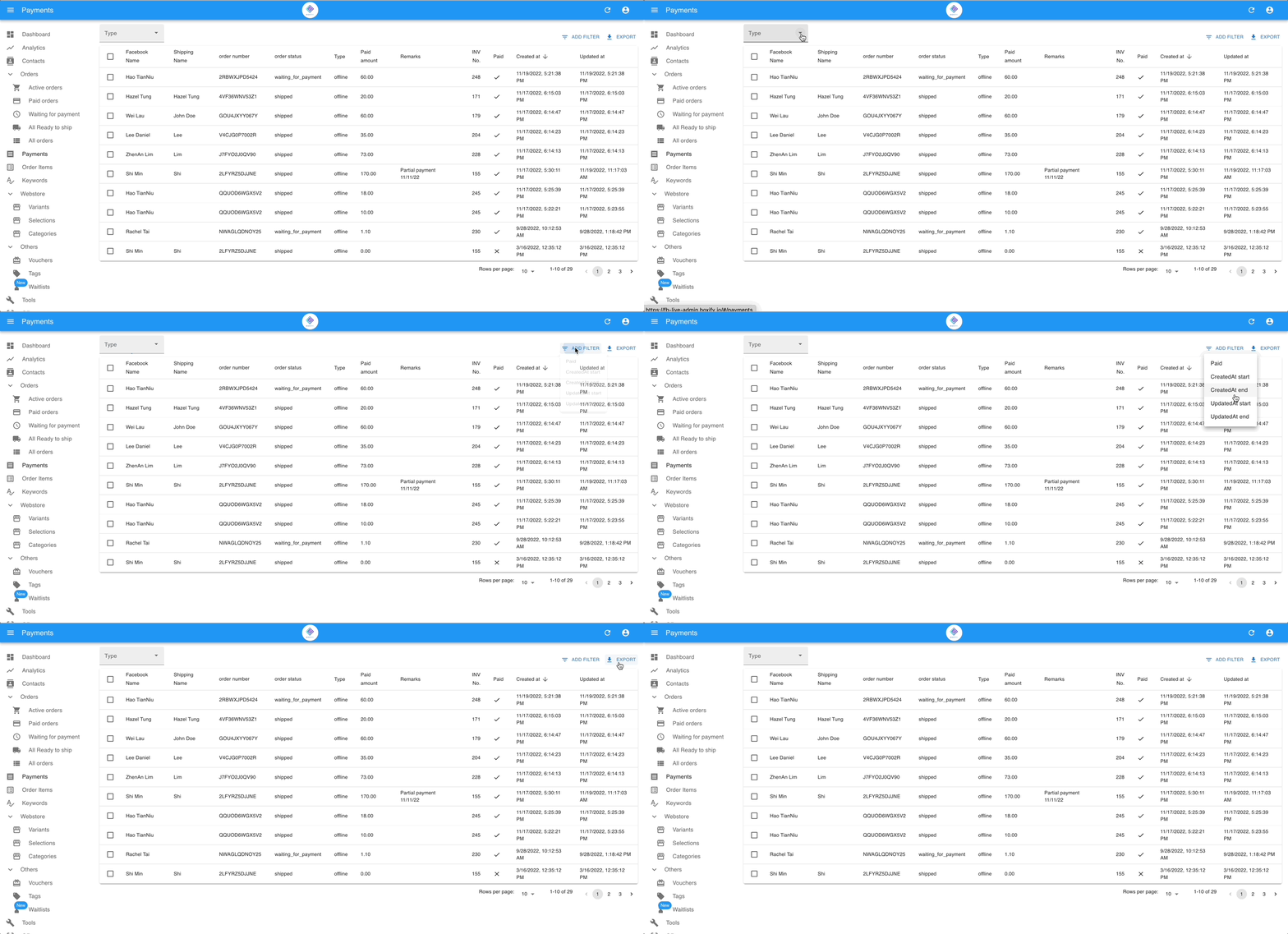
- Go to Payments in the left menu.
- Use the filters to narrow your search — filter by Payment Type, Payment Created Date, or Payment Updated Date.
- Click Export.
The exported file lists each payment as a row and a detailed payment record in CSV format. Use it for bank reconciliation, monthly verification, or accounting.
See also: